Step-by-Step Guide to Optimize Your Google My Business (2026)
If you want your business to appear in “near me” searches, get more calls, more website visits, and more real customers — Google My Business (now called Google Business Profile) is your most powerful free tool.
In 2026, your Google Business Profile (GBP) acts like a mini-website on Google Maps: Shows your reviews Shows your photos Helps people find you Helps you rank above competitors
This guide is written in simple language with a step-by-step process, recommended tools, and examples of top brands.
 Why Google My Business Optimization Matters
Google displays the top 3 businesses in the “local pack.”
These 3 businesses get:
-
60–70% of all local clicks
-
Up to 80% of calls
-
Most of the “directions” requests
If your profile isn’t optimized, competitors will outrank you.
 Even big brands like Starbucks, Domino’s, KFC, and Decathlon use GBP optimization to appear first in Maps.
 Let’s Start the Optimization Journey
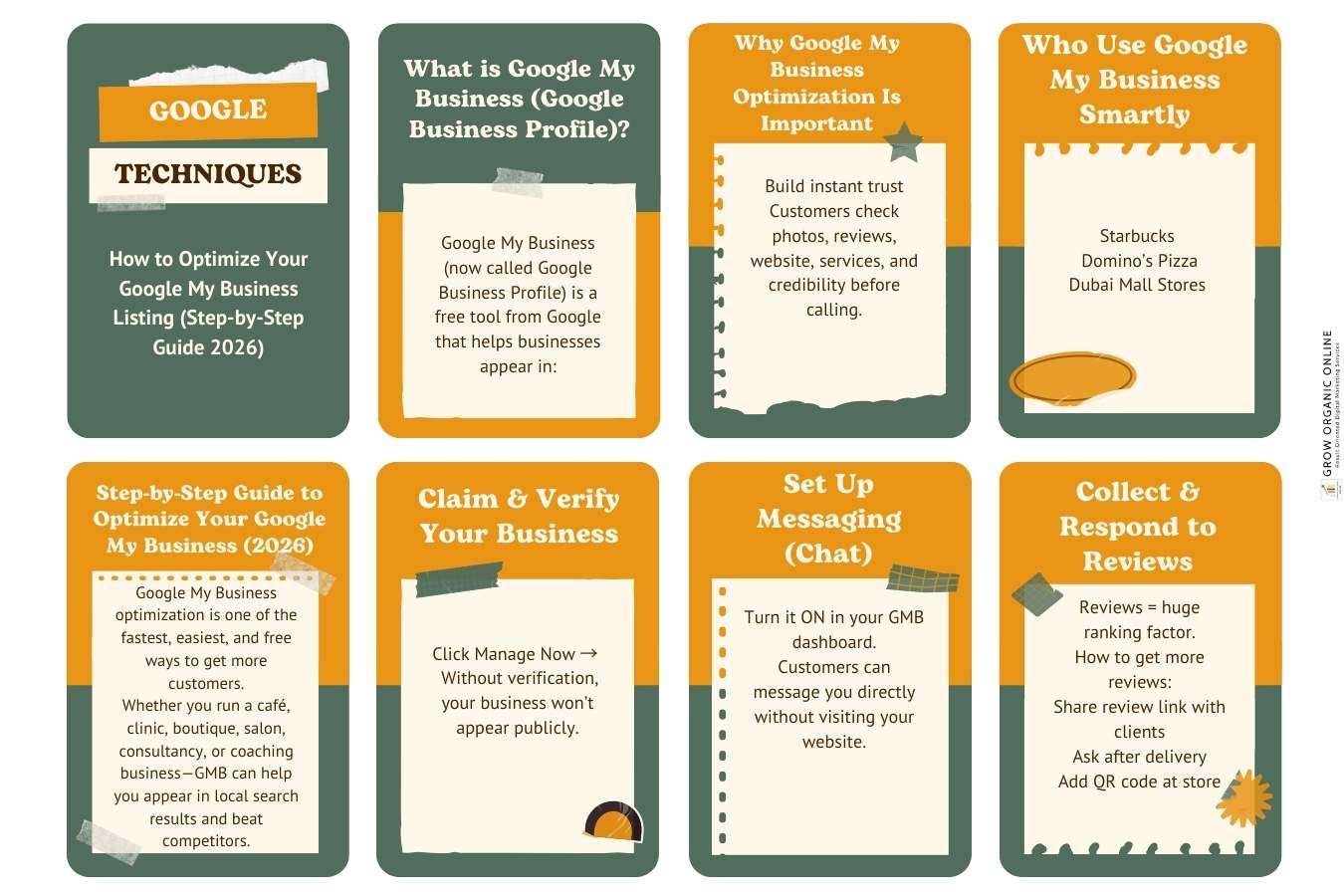
Step 1: Claim & Verify Your Business
Go to Google’s official setup page: https://www.google.com/business/
Sign in, search your business name, and claim it.
If you’re new, create a new listing.
For detailed help, use Google’s official support: https://support.google.com/business
Verification Methods:
Postcard Phone Email Instant verification (if website is verified on Search Console)
Step 2: Add Complete Business Information (NAPWIC Principle)
NAPWIC means:
Name, Address, Phone, Website, Industry, Category
This information must match exactly across the internet.
For guidance, refer to Google Search Central Local SEO Guide: https://developers.google.com/search/docs/fundamentals/local
Tips:
-
Use your main keyword in the business description
(Example: “Interior Designer in Dubai | Luxury Home Decor Services”) -
Add secondary categories (Example: Interior Designer → Kitchen Remodeler)
-
Add holiday hours, special hours, service areas
For best practices, check Moz’s GBP Optimization Guide: https://moz.com/learn/seo/google-business-profile
Step 3: Add Photos, Videos & Geo-Tagged Images
People trust visuals more than text.
Upload:
Logo Cover photo Inside/outside photos Team photos Product/service photos Short videos (10–30 seconds)
Add Geo-Tags (Optional but powerful)
Use this tool: https://www.geoimgr.com/
TIP: Add photos regularly — weekly uploads help ranking.
Step 4: Add Services, Products & Pricing Clearly
This helps in appearing for specific keywords.
Example:
-
“AC Repair in Sharjah”
-
“Mental Health Therapy Online”
-
“Interior Design Consultation – Dubai”
Use Search Engine Journal’s advanced guide if needed: https://www.searchenginejournal.com/google-my-business/optimization-guide/
Step 5: Post Every Week (Google Loves Freshness)
Google rewards consistency.
Types of posts to use: Offers Updates Events Before/After transformations New arrivals FAQs answered in post form
You can design attractive posts using Canva: https://www.canva.com/
(Replace with your affiliate link if needed.)
Step 6: Get More Reviews (The Real Ranking Booster)
Reviews are one of the strongest ranking factors in local SEO.
How to Get Reviews Fast:
-
Ask happy clients immediately after service
-
Add the review link to your WhatsApp
-
Print QR codes
-
Use automated emails / SMS
Create a direct review link using this tool: https://supple.com.au/tools/google-review-link-generator/
You can also generate a review request template: https://www.whitespark.ca/review-handout-generator/
For ranking factors backed by data, refer to BrightLocal’s study: https://www.brightlocal.com/research/google-business-profile-local-ranking-factors/
Step 7: Answer Questions in the Q&A Section
Add the most commonly asked questions yourself.
Example questions:
-
“Do you offer home delivery?”
-
“What are your charges?”
-
“Do you provide online consultations?”
This reduces customer friction and boosts ranking.
Step 8: Use Local SEO Keywords (Very Important for 2026)
Use Ubersuggest for keyword research: https://neilpatel.com/ubersuggest/
Search for:
-
“[keyword] near me”
-
“best [service] in [city]”
-
“affordable [service] in [city]”
Sprinkle these keywords in your: Business description Services Posts Reviews (ask customers to include keywords naturally)
Step 9: Build Local Citations (Backlinks for Local SEO)
Local citations = your business listed on trusted websites.
Use this tool to find the best citations: https://whitespark.ca/local-citation-finder/
Add your business to:
-
Yelp
-
Bing Places
-
Yellow Pages
-
JustDial
-
Sulekha
-
UAE Yellow Pages
Citations help Google trust your business more.
Step 10: Track Performance & Keep Optimizing
Google provides powerful insights: Calls Website visits Direction requests Photo views Search terms
Analyze them and keep improving.
 Lead Generation: Want Us to Optimize Your Google Business Profile?
If you want professional help, my team can handle:
-
Full Google Business Profile Setup
-
Review Management System
-
Local SEO
-
Weekly Posting
-
30-Day Optimization Sprint
 Contact us here: https://groworganiconline.com/contact-us/
Or explore our digital marketing services: https://groworganiconline.com/services/social-media-marketing/
Famous Brands That Use GBP to Win Local Markets
-
Starbucks — uses photos, menu posts, reviews
-
Domino’s — uses Q&A, service categories, and weekly updates
-
IKEA — uses geo-tagged photos + events
-
Sephora — uses Google Posts + video content
You can apply the same strategies to your business.
 Final Thoughts
Google My Business is not a one-time setup — it’s a weekly growth tool.
If you follow this entire step-by-step process: Your ranking improves More customers find you More people call you You get more leads organically
In 2025, businesses that optimize GBP win. Those who don’t get lost.
Digital Marketing Services
Local SEO Strategies Guide
Google Business Profile setup service
on-page SEO optimization
professional content writing
Monthly Content Calendar Templates
Book a Free Consultation